
Skip to content
Technology News Information & Jobs

Technology News Information & Jobs

Ubuntu Tutorials, Ubuntu How To , Linux Tips, Tech Jobs

  • Work with US
  • Search Jobs
  • Post a Job
  • Contact Us
  • Ubuntu
    • Ubuntu 18.04
  • Ubuntu 20.04
  • Ubuntu 22.04
  • Themes
  • Linux
  • Laptops
  • Tutorials
  • Job Dashboard
  • Toggle search form
Install ttyload In Linux : Graphical Tracking Tool For Load Average

Install ttyload In Linux : Graphical Tracking Tool For Load Average

Posted on May 5, 2019 By admin No Comments on Install ttyload In Linux : Graphical Tracking Tool For Load Average

Insight: Install ttyload In Linux : Graphical Tracking Tool For Load Average In Terminal

Ttyload is a color-coded graphical tracking tool to monitor load average in terminal.  It gives a color-coded graph of load averages over time.
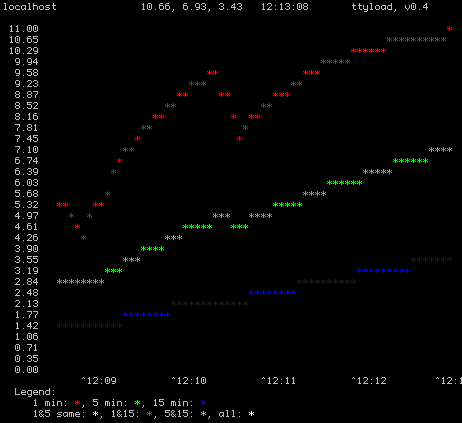
 

Install ttyload In Linux : Graphical Tracking Tool For Load Average

Install ttyload on Debian/Ubuntu Linux

Run the following command to install ttyload on Ubuntu or Debian based Linux operating system:
$ sudo apt-get install ttyload

Install ttyload on FreeBSD Unix

You need to type the following pkg command to add the package on FreeBSD operating system:
# pkg install ttyload
And if you want to install the port, Run the following command:
# cd /usr/ports/sysutils/ttyload/ && make install clean

Install ttyload using source code

Type the following commands:
$ git clone https://github.com/lindes/ttyload.git
$ cd ttyload
$ make
$ ./ttyload
$ sudo make install

After installation is completed, Run the following command in your terminal to run ttyload:
$ ttyload

To turn on the monochrome mode:

$ ttyload -m

Run the following command to alter the number of seconds in the interval between refreshes.
$ ttyload -i 6
$ ttyload -i 1

Note: The default interval is 4 and the minimum is 1.

READ More Relevant Stuff:  Mbps To MB/s Converter
Linux

Post navigation

Previous Post: Multiple Ways To Update Linux Kernel In Ubuntu
Next Post: Monitor Disk I/O Activity In Linux With Iotop Command

Related Posts

Install Microsoft Edge In Ubuntu [Dev Preview] Install Microsoft Edge In Ubuntu [Dev Preview] Linux
5 Linux Skills to be An Effective Cybersecurity Professional 5 Linux Skills to be An Effective Cybersecurity Professional Linux
open source vpn tools Some Of The Best Open Source VPN Tools Linux
Happy Birthday Linus Torvalds Linux
how to install firefox in ubuntu Firefox 63 Released, How To Install Firefox In Ubuntu Linux Linux
How To Fix netstat Command Not Found On CentOS 7 / RHEL 7 How To Fix netstat Command Not Found On CentOS 7 / RHEL 7 Linux

Leave a Reply Cancel reply

Your email address will not be published. Required fields are marked *

Recent Posts

  • New Job Search October 10, 2025
  • How To Enable Hibernate in Ubuntu 22.04 LTS May 20, 2024
  • Popular Ubuntu Games: Top 5 Games To Play March 17, 2024
  • WordPress | Your site doesn’t include support for the “generateblocks/container” block GenerateBlocks Plugin February 11, 2024
  • Ubuntu Autoremove Command Debian Autoremove Command February 10, 2024
  • How To Mount Windows 11 Shares on Debian Linux December 7, 2023
  • Anonymous Browsing 101: A Deep Dive Into Residential Proxies November 20, 2023
  • How To Correctly Install Uninstall Linux Ubuntu Nvidia Drivers Fast October 31, 2023
  • Ethical Web Design: The Dos and Don’ts October 28, 2023
  • Understanding the Role of Security Operations Center October 25, 2023
  • The Positive Effects of AI Tools and Online Services on Students Successful Essay-Writing Skills October 3, 2023

Categories

  • Android
  • Apple
  • Blogs
  • Debian
  • Fix
  • Gadgets
  • Game
  • Google
  • How To Ubuntu
  • Internet
  • Laptops
  • Linux
  • Linux Commands
  • Linux Game
  • Linux Mint
  • News
  • Operating Systems
  • Security
  • Technology
  • Themes
  • Tools
  • Tutorials
  • Ubuntu
  • ubuntu 18.04
  • Ubuntu 20.04
  • Ubuntu 22.04
  • Windows 11
  • Wordpress
itsubuntu.com is an Equal Opportunity Employer. For Advertisement, Jobs, Guest posts, and any other thoughts, email us at info@itsubuntu.com
  • Principal Architect, Accelerated Computing

    • Santa Clara, CA
    • Nvidia
    • Full Time
  • Senior AWS Architect

    • Remote
    • Shrive Technologies LLC
    • Full Time
  • Architectural Designer

    • Greenwood Village, CO
    • The Dimension Group
    • Full Time
  • Senior MDC Architect

    • Austin, TX
    • AMD
    • Full Time
  • Director of Architecture

    • Chicago, IL
    • Insight Global
    • Full Time
  • Senior Architect, NVLink

    • Westford, MA
    • Nvidia
    • Full Time
  • Architect

    • United States
    • Scout Exchange
    • Full Time
  • Computer Architecture & Systems Fundamentals Career Training Program

    • Atlanta, GA
    • Year Up United
    • Internship

Copyright © 2026 Technology News Information & Jobs.

Powered by PressBook Grid Blogs theme